
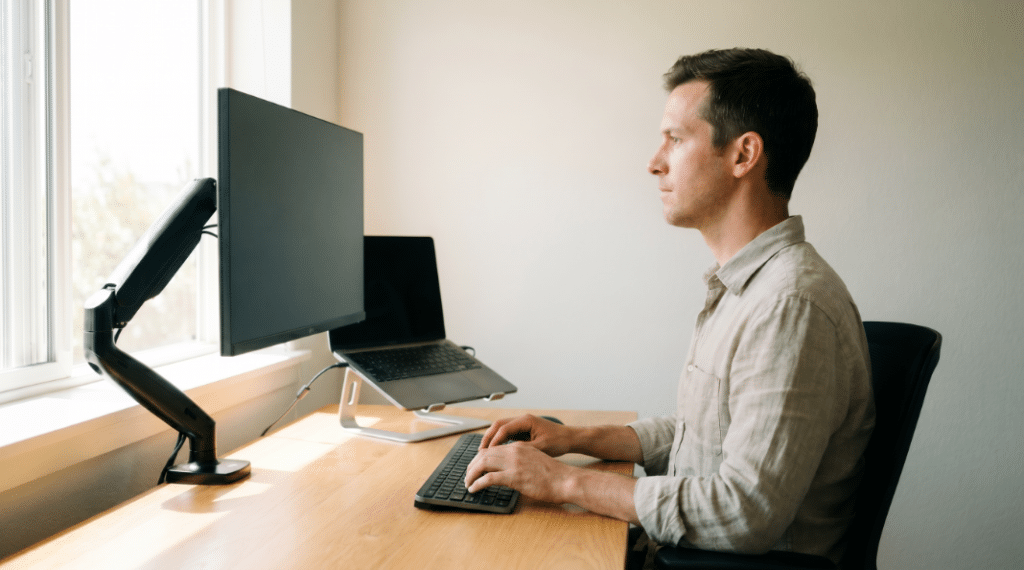
Good desk posture is about ergonomics: how your chair, desk, keyboard and screen line up with your body.
Concentrating harder on sitting up straight doesn’t fix a chair that’s the wrong height or a screen set too low.
Correct sitting posture rarely lasts past the first ten minutes if the chair is set too low or the monitor sits at the wrong height.
Poor posture creeps back in as soon as concentration slips, but adjusting the equipment properly changes the posture that follows from it.
A slightly wrong setup builds strain gradually over several weeks, often unnoticed until an ache is already established.
A chair set two centimetres too low, or a screen angled slightly downward, is enough on its own to shift how your neck and lower back sit for eight hours a day.
The next few sections go through the chair, the desk and the screen in turn, since each one needs a different adjustment.
Getting good posture from your chair – By expert Glasgow physiotherapists
Chair height and posture for sitting
Your feet should rest flat on the floor, with your hips sitting slightly higher than your knees. If the desk is too low or the chair too high to allow this, a foot rest closes the gap.
The back of your knees should clear the front edge of the seat by a couple of centimetres. Too little seat depth pushes you forward, and too much cuts off circulation and blood flow to the lower leg.
Ergonomic office chairs suit most desks, though some people prefer a stool or a kneeling chair instead.
Either works well as long as it still lets your feet stay flat on the floor and your spine stay supported.
Get the chair right before touching the desk height or screen position, since the chair sets the baseline everything else is measured from.
The 90-90-90 starting point
A useful reference point is a roughly 90 degree angle at the hips, knees and ankles, held in a relaxed seated position. Start there, then nudge the chair and desk height from that point until nothing feels like it’s pulling or pinching.
From that starting point, small adjustments to seat height and desk height matter more than getting the angle exactly right. Aim for comfort across a full working day rather than a precise measurement.
Good spinal posture at this stage comes from even weight distribution through the hips, so no single joint carries more than its share of the load.
Supporting the natural curve of your spine
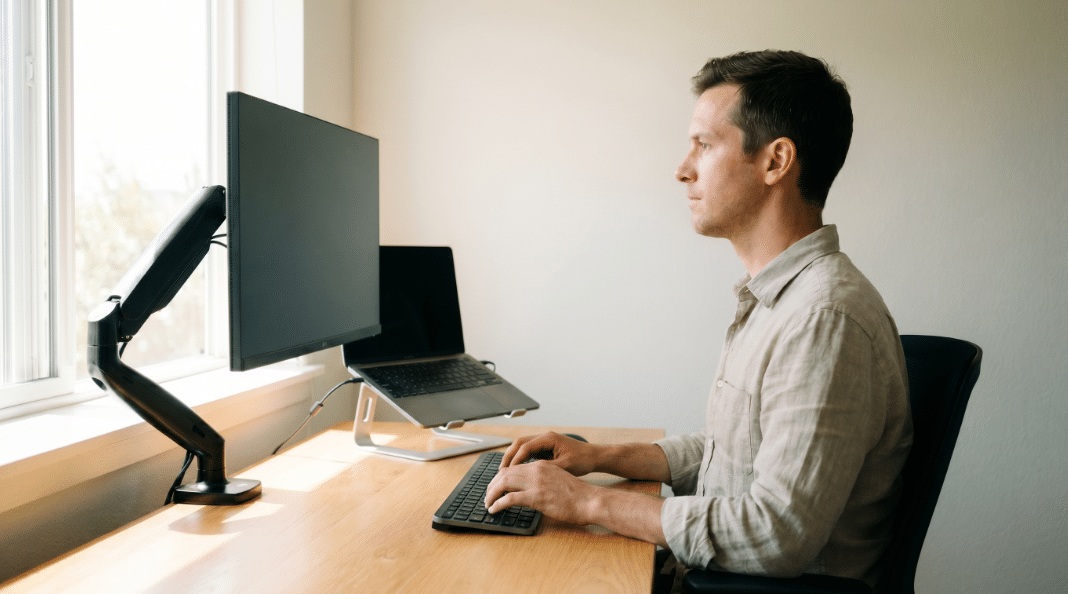
Sit with your buttocks against the back of the chair, and let the backrest support the curves of your spine instead of flattening them out.
Lower back support, whether built into the chair or a rolled up towel, keeps the pelvis in a neutral position and stops it tipping into a pelvic tilt that leads to slouching.
If your chair has armrests, adjustable ones help most.
Set them so your shoulders stay relaxed and level with the desk, resting easily rather than hunching towards your ears.
Office ergonomics for sitting at a desk
Desk height for proper posture
Your desk height should let your forearms rest roughly parallel to the floor, elbows bent around ninety degrees, wrists straight rather than bent.
A desk that’s too high forces your shoulders up, and one that’s too low tips you forward into a slouch.
Standing desks solve desk height differently, letting you change position altogether, which helps if sitting for prolonged periods is unavoidable in your job.
Keyboard and mouse within easy reach
Keep the keyboard and mouse within easy reach, close enough that you’re not stretching forward repeatedly.
Stretching for a mouse set too far away is a common cause of shoulder and neck strain that builds slowly across a workday.
A keyboard shelf or an extra inch of desk space in front of the keyboard is often all it takes to stop that reach becoming a habit.
Monitor position and eye level
Screen distance and angle
Your computer monitor should sit at eye level, roughly an arm’s length away, with the top of the screen lining up with or just below your eyeline.
Looking down at a laptop screen for hours pulls the head forward and adds real load through the neck and upper back.
A laptop stand paired with a separate keyboard and mouse solves this without buying a new desk setup.
Multiple monitors and laptops
Two monitors should sit at the same height and distance, angled so you can look between them without twisting your neck to favour one side.
If you use one screen more than the other, position that one directly in front of you.
Bad posture habits worth fixing
Slouching and forward head posture
You’ll usually catch yourself slouching by how it feels rather than how it looks.
Your lower back rounds into the seat, and your head edges forward of your shoulders without you deciding to move it.
That’s forward head posture, and of the three habits here, it does the most damage.
Every inch your head drifts forward roughly doubles the load your neck muscles have to hold it up against.
It happens gradually, usually once concentration takes over and awareness of posture drops.
Catching it two or three times a day and resetting is more realistic than trying to hold perfect posture continuously.
Crossing your legs
Crossing your legs tilts the pelvis and twists the spine slightly out of alignment, and it’s easy to do for an hour or more without noticing, especially in meetings.
Keeping both feet flat on the floor instead keeps the pelvis level and the spine properly supported.
Cradling the phone
Pinning a telephone between your ear and shoulder during calls loads one side of your neck unevenly, call after call, until it’s a habit your neck compensates for even when you’re not on the phone.
A headset or speakerphone removes it outright.
Reaching across the desk for the phone, a stapler or paperwork instead of standing up to fetch it does something similar on a smaller scale.
Standing up for it costs you a few seconds and saves your shoulder the repeated stretch.
Standing desks and taking breaks
Avoid sitting for long periods without moving, even in a well set-up chair.
Getting up every thirty to forty-five minutes resets circulation and eases the load on your spine.
Some people use a rough pattern of twenty minutes sitting, eight minutes standing and two minutes moving around as a working guide, though the exact split matters less than simply breaking up long stretches of stillness.
A standing desk adds a second good position to move into through the day. Alternating between sitting and standing works better than staying fixed in either one.
When desk changes aren’t enough
Getting a proper assessment
Correct desk posture prevents a lot of everyday aches and pains, but it won’t undo an existing injury or a spine that’s already under strain from years of a poor setup.
Neck and back pain that persists despite a proper workstation setup, along with ongoing shoulder pain, is worth having assessed properly.
A chartered physiotherapist can check your posture in person, spot compensations you wouldn’t notice yourself, and build a plan around the muscles that need strengthening or loosening.
Support for desk-based work
Long hours at a screen raise the risk of neck and back pain returning, and getting the right posture for working through a full day matters more the longer your hours run.
Our work-related injury physiotherapy service is built specifically for people in that situation.
Ongoing tightness through the neck and shoulders also responds well to deep tissue massage alongside the postural changes above, easing muscle tension that builds up around a desk long before any pain becomes obvious.
If your desk setup already looks right and the aches haven’t shifted, book an assessment online or call us on 07427 737 604.
Come in loose clothes, and we will look at how you actually sit, move and work, then build a plan around what we find.
Book Your Appointment
Ready to take the next step? Book your appointment today or call us on 07427 737 604. We’re here to help with tailored, evidence-based care.